
 Tally Prime with GST
 AutoCAD 2D and 3D (Civil Design)
 AutoCAD 2D and 3D (Mechanical Design)
 Revit Architecture (CAD / BIM)
 Creo (CAD / Mechanical Design)
 SolidWorks (CAD / Mechanical Design)
 Electronic CAD (ECE)
 Diploma in Hardware and Networking
 PGDCA
PGDCA
 Ethical Hacking
 Computer Hardware and System Administrator
 Networking N+
 Microsoft Windows Server
 The Red Hat Certified System Administrator
 CCNA and CCNP
 Advanced Java
 Java
Java
 Python
 C&C++
C&C++
 PHP
PHP
 Javascript
 CSS
CSS
 HTML
HTML
 Bootstrap
 Angular JS
 Java Full Stack
 Python Full-Stack
 SQL
SQL
 Data analytics
 Power BI
 Excel with AI
 Robotics
 PLC & SCADA
 Microsoft Office (Or) Office Automation
 Advanced Excel
 Photoshop
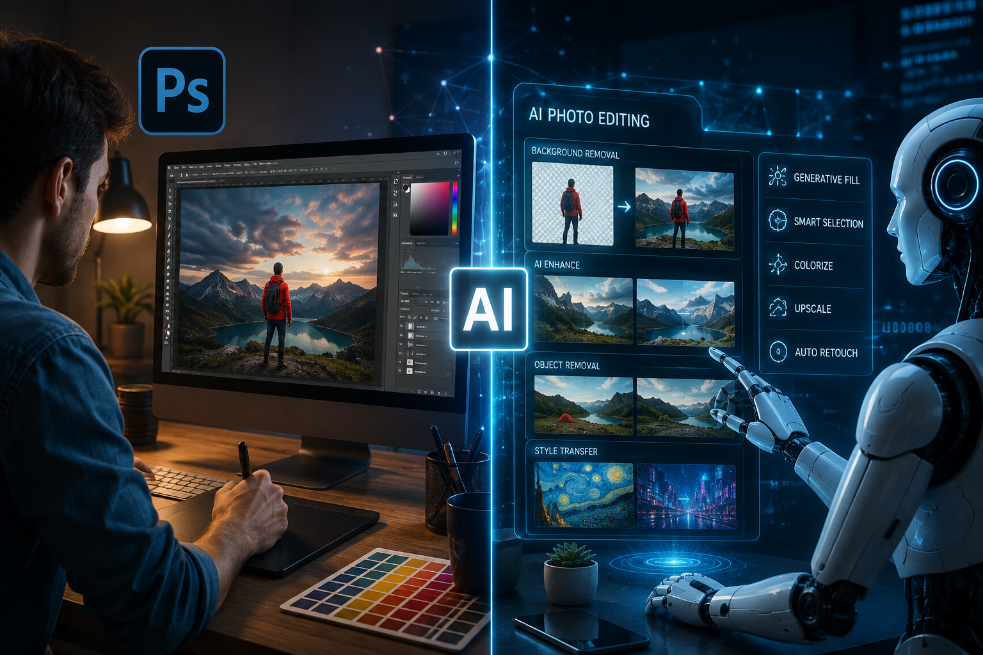
Artificial intelligence has changed the way people create and edit visual content. Tasks that once required several minutes of manual editing can now be completed with a few clicks or even a simple text prompt.
This has created an interesting question among photographers, graphic designers, content creators, and students:
Is AI going to replace Photoshop?
The short answer is no - but Photoshop is changing.
Adobe has been integrating AI directly into Photoshop, combining traditional editing tools with generative and prompt-based capabilities. In its latest 2026 updates, Photoshop introduced features such as an AI Assisted Editor, prompt-based editing, Generative Expand, Generative Fill, background removal, Generative Upscale, and AI-assisted masking.
Instead of replacing the designer, these tools are changing how designers approach image editing.
The Traditional Way of Editing Images
Before AI-powered editing became common, designers had to perform many tasks manually.
Removing an unwanted object could require careful selections.
Changing a background might involve masking, refining edges, and colour correction.
Extending an image for a different social media format required manually creating additional content around the original image.
Professional designers developed these skills through years of practice.
Tools such as layers, masks, selections, brushes, adjustment layers, blending modes, and retouching techniques remain fundamental to professional Photoshop workflows.
AI has not eliminated these concepts.
Instead, it has started making some of the repetitive parts faster.
How AI Is Changing Photoshop
The biggest change in Photoshop is the shift from purely manual editing toward a combination of manual control + AI assistance.
For example, newer Photoshop capabilities allow users to describe certain edits using natural language. Adobe's August 2026 release introduced an AI Assisted Editor in beta, alongside prompt-based editing and tools such as Generative Fill, Generative Expand, Remove Background, Remove Tool, and Generative Upscale.
This changes the workflow.
Instead of asking:
“How many steps do I need to perform this edit?”
Designers can increasingly ask:
“What result am I trying to create?”
The software can then assist with part of the execution.
What Is Generative Fill in Photoshop?
Generative Fill is one of the most recognised AI features in Photoshop.
It allows users to add, replace, or remove visual elements using text-based instructions.
For example, a designer could have a product photograph and want to add a suitable background.
Traditionally, this would involve finding an image, masking the product, adjusting the lighting, matching colours, and compositing everything together.
AI-assisted tools can speed up parts of that process.
Adobe's generative AI documentation describes Generative Fill as a way to add, replace, or remove content using natural-language prompts.
However, professional judgement is still important.
The generated result may need additional correction for lighting, shadows, perspective, branding, proportions, or visual consistency.
That is where Photoshop skills continue to matter.
Generative Expand Is Changing Social Media Design
Social media platforms use different image dimensions.
A photograph captured vertically may need to become a square post.
A landscape photograph may need to become a vertical advertisement.
Previously, designers would have to manually extend the canvas and create additional visual elements.
Generative Expand can help extend the image beyond its original boundaries and generate content that fits the existing composition.
This can be particularly useful for:
-
Instagram posts
-
Social media advertisements
-
Website banners
-
Product advertisements
-
Promotional graphics
-
Digital campaigns
Adobe has continued improving Generative Expand and related generative capabilities as part of its Photoshop updates.
AI Can Remove Objects - but Can It Replace a Designer?
Removing unwanted people, objects, wires, signs, or distractions from photographs has traditionally been a common Photoshop task.
AI-powered removal tools can now make many of these edits considerably faster.
But removing an object is only one part of professional image editing.
A designer still needs to understand:
-
Composition
-
Colour
-
Lighting
-
Typography
-
Visual hierarchy
-
Branding
-
Image quality
-
Perspective
-
Retouching
AI can generate or modify pixels.
It does not automatically understand the business objective behind a design.
For example, creating a product advertisement is not simply about making an attractive image.
The designer needs to make sure the product is clearly visible, the branding is consistent, the text is readable, and the design communicates the intended message.
Photoshop and the Rise of AI-Generated Images
Another major trend is the increasing use of AI-generated visuals.
Designers can now generate concepts, backgrounds, objects, and creative variations much faster than before.
Adobe has also expanded Photoshop's AI ecosystem with multiple generative models and Firefly-powered features.
This creates both opportunities and challenges.
A designer can generate ten concepts quickly.
But producing ten concepts does not necessarily mean producing ten good designs.
The ability to select, refine, combine, edit, and improve AI-generated content is becoming increasingly valuable.
Why Photoshop Skills Are Still Relevant
AI may automate certain editing tasks, but Photoshop remains valuable because professional design involves much more than image generation.
Consider a simple business advertisement.
The designer needs to decide:
Which image should be used?
Where should the logo be placed?
What typography should be selected?
How much empty space should the design have?
Which colours match the brand?
What should the customer notice first?
AI can help execute some of these tasks, but creative direction and design judgement remain essential.
This is why modern Photoshop learning should not focus only on memorising tools.
It should focus on understanding design + mastering editing + using AI intelligently.
The New Photoshop Workflow
The modern Photoshop workflow is increasingly becoming a combination of traditional tools and AI.
A typical project could look like this:
Idea → AI-generated concept → Photoshop composition → Manual masking and adjustments→ AI-assisted editing→ Colour correction → Typography and branding → Final retouching → Export for Web / Social Media / Print
Export for Web / Social Media / Print
This hybrid workflow allows designers to use AI for speed while retaining manual control for accuracy.
Will Photoshop Become Easier for Beginners?
AI is certainly making some Photoshop tasks more accessible.
A beginner may not know how to perform a complex selection but may be able to describe the desired change using a prompt.
At the same time, this creates another problem.
If everyone can generate an image quickly, good design becomes even more important.
A basic AI-generated image may look impressive at first glance, but professional design requires consistency, originality, purpose, and attention to detail.
Therefore, beginners should not learn Photoshop only by depending on AI.
They should understand the fundamentals first and then use AI as a productivity tool.
Photoshop Skills That Will Matter More in the AI Era
As AI takes care of more repetitive editing tasks, certain human skills become even more valuable.
Creative Thinking
Designers need to develop original ideas instead of simply accepting the first AI-generated result.
Visual Communication
A design must communicate something clearly to its audience.
Brand Understanding
Colours, typography, imagery, and layouts need to follow the identity of the brand.
Image Retouching
AI-generated or AI-edited images may still require manual corrections.
Typography
Good typography can significantly change the quality of a design.
Composition
Understanding where and how visual elements should be positioned remains a fundamental design skill.
AI Prompting
Knowing how to communicate creative instructions clearly to AI tools is becoming another useful skill for modern designers.
What Does This Mean for Students Learning Photoshop?
Students who are currently considering Photoshop Training in Trichy should not think of AI as a replacement for learning Photoshop.
Instead, they should learn both.
Understanding traditional Photoshop gives students control over the editing process.
Understanding AI tools gives them speed and new creative possibilities.
Together, these skills can create a more modern workflow.
Someone who knows only AI tools may struggle when the generated result needs detailed correction.
Someone who knows only traditional editing may take significantly longer to complete certain repetitive tasks.
A designer who understands both Photoshop and AI-assisted workflows can have an advantage.
Photoshop Is Moving From Editing Software to Creative Workspace
The evolution of Photoshop shows a larger change happening in the creative industry.
Photoshop is no longer only about adjusting pixels manually.
Its newer features increasingly connect:
Photography + Graphic Design + Generative AI + Image Editing + Creative Exploration
Adobe's recent updates include not only generative features but also tools such as Light Adjustment Layer, Dynamic Text improvements, Firefly Boards integration, and AI-assisted editing.
This suggests that the future of image editing is likely to be more collaborative between the designer and the software.
Should You Learn Photoshop in 2026?
If you are interested in graphic design, photography, digital marketing, social media content, advertising, or creative work, Photoshop remains a useful skill to learn.
But the approach should be different from the traditional way of learning.
Instead of learning:
“Which button does what?”
Focus on:
“How can I create the result I want?”
Learn the fundamentals.
Understand layers and masks.
Practise retouching.
Learn colour correction.
Understand composition.
Experiment with typography.
Then explore AI-powered tools and understand where they can improve your workflow.
The Future of Photoshop and Graphic Design
The future is unlikely to be purely manual or purely AI-generated.
It will probably be a combination of both.
AI can handle repetitive tasks.
Designers can focus more on concepts, storytelling, branding, creative direction, and quality control.
This could actually make Photoshop skills more valuable in a different way.
The designer of the future may spend less time performing repetitive technical actions and more time deciding what should be created and how it should communicate with the audience.
Final Thoughts
AI is changing Photoshop, but it is not making Photoshop irrelevant.
Instead, Photoshop is becoming an increasingly AI-assisted creative environment.
The most valuable skill for a modern designer is therefore not simply knowing Photoshop or knowing AI.
It is knowing how to combine both effectively.
For students and aspiring designers searching for a Photoshop Course in Trichy, this is an ideal time to build a strong foundation in image editing while also understanding the latest AI-assisted creative tools.
The future of graphic design may not be AI vs. designers.
It may be:
AI + Designers creating better work together.
Learn. Create. Edit. Innovate.
With platforms such as METS Computer, learners interested in Photoshop and graphic design can explore the changing world of digital creativity while building the practical skills needed for modern visual communication.




Comments (0)
No comments available.